Kidsbar: A Playful Display Font for Creative Web Design
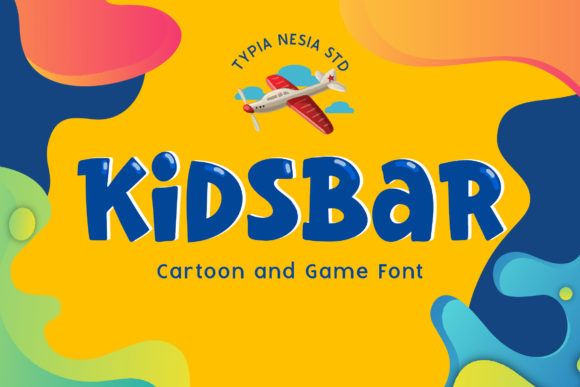
When it comes to crafting a visually engaging and memorable web experience, the right font can make all the difference. Kidsbar is a delightful display font that brings a childlike playfulness and creativity to any project, making it an excellent choice for designers looking to add a unique and cheerful touch to their digital creations.
Visual Characteristics and Personality of Kidsbar
Kidsbar stands out with its whimsical and playful design. The letters are rounded and bouncy, reminiscent of a child's handwriting, which adds a sense of innocence and fun. This typeface is perfect for projects aimed at children, educational websites, or any brand that wants to convey a lighthearted and friendly tone.
Website Headers and Hero Sections
Incorporating Kidsbar into your website headers and hero sections can instantly set a welcoming and playful atmosphere. Use it for the main title or tagline to grab attention and create a memorable first impression. For example, a children's book author's website could use Kidsbar for the header, making the site feel more approachable and engaging for young readers.
Landing Pages and Call-to-Action Areas
For landing pages, Kidsbar can be used creatively in call-to-action (CTA) buttons and short, impactful phrases. Its playful nature can make CTAs more inviting and less intimidating, encouraging users to click and explore further. Consider using Kidsbar for a CTA like "Join the Fun" on a kids' activity app landing page.
Online Shop Banners and Product Descriptions
Boutique online stores, especially those selling children's products, can benefit from Kidsbar's charming style. Use it for banners, product titles, and even some short descriptions to create a cohesive and appealing visual identity. For instance, a store selling eco-friendly toys might use Kidsbar for the banner text "Play Green, Live Clean" to highlight their mission in a fun and engaging way.
Readability and Visual Hierarchy
While Kidsbar is highly decorative, it's important to balance its use with readability. For longer texts or body copy, pair Kidsbar with a clean, simple sans serif font. This combination ensures that the content remains easy to read while still benefiting from the playful energy of Kidsbar. For example, use Kidsbar for section headings and a sans serif like Arial or Helvetica for the body text.
Mobile and Responsive Design
On mobile screens, it's crucial to ensure that Kidsbar remains legible. Use it for larger elements like titles and headings, and avoid using it for small buttons or fine print. Additionally, test the font on various devices and screen sizes to ensure it scales well and maintains its charm without sacrificing readability.
Font Pairing and Brand Identity
To create a balanced and professional look, pair Kidsbar with more neutral fonts. A classic combination is using Kidsbar for headlines and a modern sans serif like Open Sans or Lato for the body text. This pairing allows the playful nature of Kidsbar to shine while maintaining a clean and readable overall design. For a more editorial or sophisticated look, consider pairing Kidsbar with a serif font like Georgia or Merriweather.
Commercial Licensing and Usage
Before using Kidsbar in your projects, make sure to check the commercial licensing terms. Many premium fonts, including Kidsbar, come with specific usage rights for websites, client projects, and digital assets. Ensure you have the appropriate license for your intended use, whether it's for a personal blog, a client's e-commerce site, or a digital template you plan to sell.
Conclusion
Kidsbar is a versatile and playful display font that can add a unique and joyful touch to your web designs. By carefully considering its use in headers, hero sections, and other key areas, you can create a visually appealing and engaging user experience. Pair it with a clean, simple font for body text, and always test for readability across different devices. With the right approach, Kidsbar can help you build a memorable and delightful online presence.